

Okay, so you want to know how to build your own business website, right?
If you’re starting a business, money is often tight. Between licenses, equipment, insurance, marketing, and everything else, hiring a web designer may not fit your budget right away, and that’s okay!
That’s why I came up with this detailed article explaining the key steps in creating and launching your website from scratch! It’s absolutely possible to do it on your own, but you want to keep these pointers in mind! There are many steps that maybe you hadn’t even thought of. It’s not wise to just let AI start your site, type a few prompts, and think that’s it. Job done…It’s not.
I definitely wouldn’t recommend that route either, even if you just need a very simple site.
You still want to make sure you are covering all your bases when launching your site. This is your first impression. Don’t leave it to generic AI to design your site. Always customize, add your own personality, and update that content to be a genuine read from a human to humans. Of course, search engines are important too, but we will get to that later in this article!
So, I’m going to show you the foundation of building your own website. Regardless if you end up creating it yourself or decide you’d rather have someone else handle it, you’ll understand what actually goes into a quality website.
So if you’re interested in building your own site or just want to know what goes into creating one, here’s your step-by-step guide to building your own business website from scratch, no gatekeeping, just information.
Table of Contents
Choosing a Domain Name
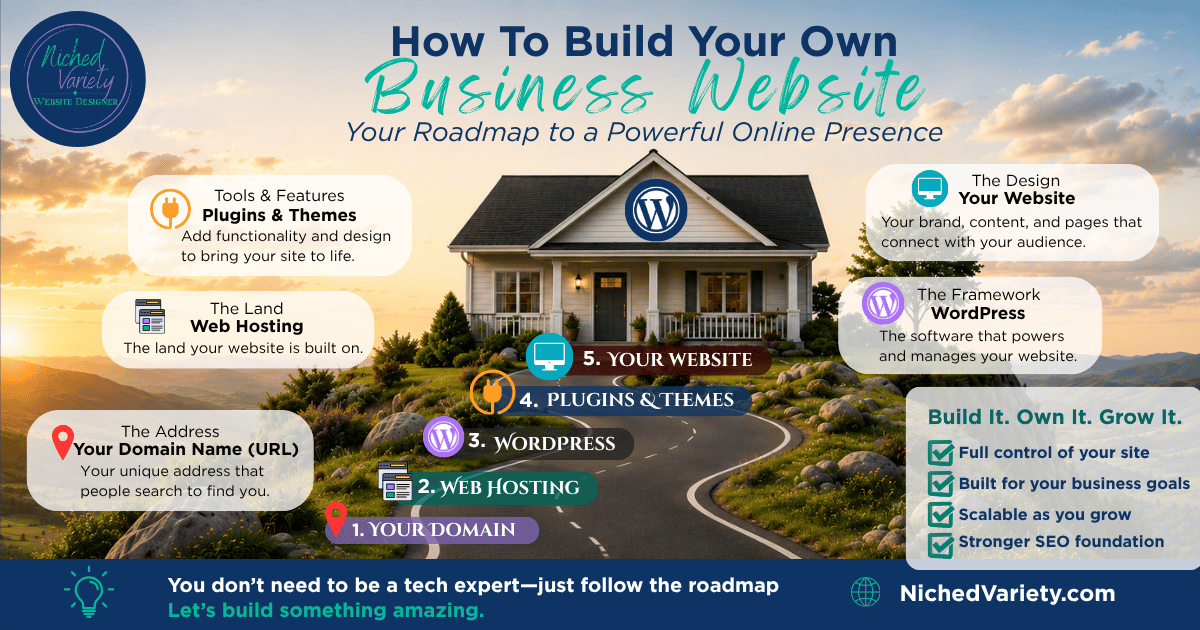
This is the first step in starting up your own website! Decide on a name that reflects your business and isn’t too long. Think of your domain name as your street address. It’s the location of your home—it’s the specific address to find you.
Your domain name is your web address, that URL you type in when you are looking up a specific website. So choosing an easy-to-remember, simple, but reflective name is important.
Purchasing your domain name is generally done in an annual interval; however, you can opt for a lengthier purchase, too. It’s also generally fairly cheap, ranging from $12 to $35. There are multiple sources you can purchase your domain from, and sometimes you can even find a deal on your domain purchase ranging from free to $6.
Here’s a few examples of where you can purchase a website domain:
Now these platforms can also be used to host your domain name, meaning your website will become a live and searchable site. That brings us to the next step in creating your business website.
Website Hosting
In my opinion, the best is to self-host. This gives you room to grow within your site; you own it, and you have many more options in customization.
Hosting providers would be like Bluehost or SiteGround, who supply that platform. There are monthly or yearly costs to keep your site up and running; however, the freedom comes from being able to move your domain whenever you want to. You purchase the domain. You own it.
Okay, so we know a domain name is your street address. Now a hosting platform is the land your address resides on. They go hand in hand with each other. You can’t have one without the other.
Many times, as a new customer, you can get deals on your first year or first purchase with a hosting provider.
Two I would recommend are:


There are usually monthly or annual plans available to help in reducing upfront costs and more flexible options. I have used both these hosting providers before. I, personally, lean on SiteGround. Now in all transparency, pay attention to those renewal dates as they are usually more expensive; however, having the ability to pay monthly still reduces a heavy out-of-pocket cost.
Now let’s get into the details about the software your website would use.
WordPress (Your Website Software)

So, to recap-we discussed the need for a domain name and hosting providers, and now we will dive into the software behind your site. You are on your way to learning how to build your own business website!
Here’s your software for creating your website. First, I’m going to talk about WordPress. Now, WordPress acts as your actual home itself. It’s the house you build on that land. WordPress is a software called CMS (Content Management System) that lets you build, organize, and manage your website without writing everything from scratch.
There are two different WordPress platforms, so make sure you’re choosing the right one. Most commonly used is WordPress.org (self-hosted WordPress)
Now you can run into other software that operates similarly; however, there are different limitations on each.
WordPress.org versus WordPress.com
| WordPress.org | WordPress.com |
| You own everything | WordPress hosts it |
| Choose any hosting company | Hosting is included |
| Install any plugin | Limited by plan |
| Install any theme | Limited options |
| Best for businesses | Better for hobby sites or personal blogs |
| Full SEO control | Some SEO limitations |
| Can move hosts at anytime | More platform restrictions |
At the end of the day, it’s up to you which type would best serve your business, but here’s the breakdown for you to make the best decision.
Planning How to Make Your Own Business Website a Success
It’s a good idea to write out your plans for your website before you just jump into everything. This way, you have a way ahead and can avoid some obstacles by having a clear vision of what your website will look like, what will be included, and what your goals are.
After narrowing down business names, domain names, who you will host with, and what software you will use, the next step is figuring out the make-up of your site. So this means, what pages will you include, what content will be represented on each page, and how your visitors will navigate within your website.
Most common website pages:
- Home
- About
- Services
- Portfolio/Gallery
- Contact
- FAQ
- Blog (optional)
What Is the Purpose of Your Website Pages?
Okay, now we know a general idea of what pages you should include in your website. The next step is figuring out what you fill those pages with. Let’s dig into the content of each page to best optimize your business goals.
Home
Your home page is generally your most common landing page. When someone searches for your website or searches for something that your business solves (we will dig into this later) and your page comes up, this is where visitors land first. So making sure you are presenting your home page professionally, easily showcasing what you do and who you are, is vital.
About
This is where you will tell who you are and what you’re all about. People like to buy from people. They like the backstory, what led you to your services, but as always, they also need to know what you can do for them. How are you going to solve their problems? How are you qualified to do so?
Services
Okay, pretty self-explanatory here, but this is the page that details your services to visitors and your potential customers. Now, depending on how many services you offer, it might be a good idea to create separate pages for each service. Nobody wants to read a cluttered and lengthy page, so having separate service pages is a great idea to help visitors find the specific service they need and click over to learn more about their specific need.
Portfolio/Gallery
Your portfolio or gallery page is where you will showcase your work, the results. Maybe you run a construction company, so this is the place you will display your finished work and progression of work so your visitors can see exactly what they can expect if they hire you.
Maybe you are a freelancer; this is where you would showcase your case studies and show your finished work, whether that be blog articles, website designs (like my own portfolio page),
Contact
How do you want your potential customer to contact you? You can offer your business number, email address, business hours, location-all on your contact page. You could also include a contact form for potential customers to fill out that will go right into your inbox with their details. Making it easy for customers to contact you is the best method to avoid any obstacles. If they can’t find your information easily, or it’s too complicated, they may just move on and find another business to solve their problems.
FAQ
Frequently Asked Questions. This is great for answering those repeated or frequent questions you’re bound to get. It allows your visitors to research your company further before contacting you. Of course, we want the contact, but allowing them to review frequently asked questions can give them some direction about you, and if any question they have is left unanswered, they can easily lead with that when contacting you.
Blog (optional)
Your blogs or articles are obviously optional and not always necessary; however, they can be a great way to share your expertise and inform your visitors. It also is highly valuable with search engines and offers another way for your website to pop up in a user’s search. We will dig into more about search engines, but blogging is a great way to enhance your value to both search engines and your visitors.
How to Build Your Own Business Website: Start Writing Your Own Content

You know now what to include as pages, but what are you really supposed to do when writing your website copy? Well, your website copy should be focused on your visitors and potential customers. Explaining what you do, what services you offer, who you are, and most importantly, why they should choose you.
Write for people. Not AI, not just search engines. If you write well for the people who will view your site, then optimize strategies to help search engines find you, and everything else will fall into place. Obviously, there are key points you want to keep in mind when writing your copy so that search engines pick you up, but you write for humans first while incorporating SEO strategies so search engines recommend your pages.
Key aspects when creating your website copy:
- Write for people first
- Explain your services clearly
- Avoid industry jargon
- Build trust
- Include benefits, not just features
- Every page should have a purpose
Basic SEO Foundation

You’ve made it this far! You know what to write about, the pages to include, where you’re hosting, and your domain address is purchased, and now it’s time for SEO (Search Engine Optimization).
You can have a beautiful website with great copy, but if it’s not SEO optimized, you might be missing a ton of traffic.
This is a vital part of any website that seeks to build an audience.
You know that search engine you probably use daily? Well, millions of other people also use it, and they are searching for specific things, solutions to their problems, products they need or want, researching, etc. And whatever you put on your site—you want to be found.
How do they find you? — with SEO.
What SEO Actually Is
As we now know, SEO stands for Search Engine Optimization. It’s what search engines use to recognize valuable content to show their users.
This is what helps drive traffic to your website organically. Organic traffic is the ultimate goal. It’s free traffic, but it does take effort, dedication, and time to build. You can’t just make a website and expect customers to just start contacting you! (That would be great, right?!)
Unfortunately, there are constant efforts to drive traffic to your site, and a large step in that is SEO. SEO is based on keywords. Keywords are what users type into a search engine. There are many ways to rank for them. There is also competition out there, and for a new website, it’s not ideal to use the highest competing keywords (we will dive into keywords soon!)
Yet, when creating your content, you will want to keep keywords in mind to help your SEO.
Heading Structure
Heading structures are H1, H2, H3, H4, H5, and H6 options when you’re working on writing your content. These structures are an important part of your SEO, giving search engines an understanding of how your content is structured. Most importantly, give your actual users structure on your content. Most times, people are skimming content. They aren’t reading every single word or sentence. So, having a good structure can help them find what they are looking for as quickly as possible.
Always, always, only have one H1 header on each page. All the other headers can be used multiple times in correct formatting. Yet, only one header per page is the rule of thumb. It’s the main purpose of each page, always at the top.
Keywords
Here it is! Keywords, which we briefly discussed in the beginning of the SEO section. Keywords are what signal search engines about your content to match it to what users are actually searching for. But keywords aren’t just single words—they are also phrases.
“What is safe for my dog to eat?”
“When should I change my oil?”
“Where do I find a website designer?” (wink, wink)
These are all examples of keywords and phrasing.
There are keyword search tools out there you can use to help in your research on what keywords to use in your content. Some are free resources, and others are paid. As you’re first starting out, you may not have the funds to back every single tool for your business website—and that’s okay! An important tip when targeting your keywords you want to rank for is to make sure you stand a chance to rank for it.
There is something called website authority as a trust signal to search engines; the higher the authority, the better the odds at ranking for those more competitive keywords. So if you’re just starting out, you will want to keep that authority number within reach until you build up to high-ranking potential.
Here are a couple of keyword tools you can use:


Then, there is also just plain searching. Start typing your topic into your search engine and see what suggestions pop up. You can also proceed with a search and then scroll through the results until you hit the “people also search for” section to see what other keywords or phrases people are actively searching for.
This is a free guide to actively view what people are typing into the search engines, and then you can adjust your content to help fit those search results. Keep in mind, you need to avoid keyword stuffing. Keyword stuffing is when you continue to bog down your content with the same phrase or words over and over to the point it’s not even natural. Search engines can pick that up and definitely don’t like to recommend content that does this.
Focus on naturally including keywords and phrases that naturally fit into your content. There are several locations you want keywords to generally plug into as well, so it’s not all just your content. It’s your title, headers, URL, meta descriptions, image ALT text, etc. Which we will dig into soon. But spreading your keyword over several essential areas will help search engines understand your intent without bogging your content down.
Title Tags
Another important aspect for optimizing your website for search engines. A title tag is an important on-page SEO element, but it can be easily confused with page titles.
An easy way to break this down is:
- H1 Heading: the title people see on your webpage.
- Title Tag: The title that appears in a search engine result and in the browser tab.
H1 (on the page) may say: Professional Website Design & SEO Solutions
Whereas, the title tag (in search results) may say: Website Design in Genesee County, MI | Niched Variety LLC
The blue clickable link text is the title tag. The text underneath it is the meta description (coming up next!)
So capitalizing on another opportunity to reach users searching for answers and another way to add in a keyword! Remember, just make sure it’s a natural fit.
Why Does It Matter?
Search engines, like Google or Bing, use the title tag to understand what your page is all about. It’s also the first thing potential visitors read before deciding whether to click your website or not.
A good title tag should:
- Clearly describe the webpage
- Include your primary keyword
- Be unique for every page
- Stay around 50-60 characters so it isn’t cut off in search results
Think of the title tag as your page’s headline in Google. While visitors see your H1 after they click your website, the title tag is what encourages them to click in the first place. Both should describe your page, but they don’t have to be identical.
Meta Descriptions

The descriptions that matter! This is that little snippet in search results underneath your title tag. It gives a sneak peek about what they will find if they click on your link in the search results. You want to ensure every single page or article/blog has a meta description filled out. Most times, you can plug this right into your SEO plugin.
These are tools that help you navigate the fundamentals of SEO implementation. We will dig into this later, too. Meta descriptions should include your keywords and explain your page or article simply, to the point, and tell visitors why they should click on your link. Overall, we are just getting started in this guide on How To Build Your Own Business Website.
Image ALT Text
What is image ALT text? Well, I’m glad you asked! When you upload images into your website or blog post, you have the opportunity to fill out the image ALT text. Another opportunity to signal to the search engines the purpose of the image and posts. In most cases, such as WordPress, there are settings off to your right when you click on the image to be able to fill out the image ALT text. Always do this.
It’s another opportunity, but it’s also built to help explain what your image is in the event it doesn’t load and increases your accessibility. If someone is visually impaired and uses a screen reader, the screen reader reads that ALT text aloud so they understand what the image shows. This was the primary use of image ALT text, but it’s also evolved into another way to optimize your page. Search engines can’t “see” your images like a human does.
So, this breaks down what an image is containing and how it is relevant to users.
Good Versus Bad Image ALT Text
| Good Image ALT Text | Bad Image Alt Text |
| Custom WordPress website design for a Michigan roofing contractor | image1.jpg |
| Business owner reviewing website analytics on a laptop | Website |
Best practices when adding image ALT text:
- Describe the image naturally
- Keep it fairly short (usually under 125 characters)
- Include a keyword only if it fits naturally
- Don’t stuff keywords
- Don’t begin with “image of…” or “picture of…” Screen readers already announce that it’s an image
The gist? Image ALT text is a brief description of an image that helps both people and search engines understand what it shows.
Originally it was created just for accessibility, since it allows screen readers to describe images to visually impaired users. However, it can also provide search engines with additional context, which may improve your SEO when written naturally and accurately.
Internal Linking
Internal linking is when you link from one page on your website to another- all within your website. Search engines like to see relevance within your website. Not to mention, people like to have a purpose in navigating your page and finding other relevant information quickly while browsing your site. This could be linking to your services from the homepage or linking to another article that is relevant to each other.
This can help promote a call-to-action as well. It helps lead your visitors where you’d like them to go. But make sure they actually are relevant to each other and that your links work is important in internal linking. Nothing says incapable like clicking a link that does nothing…so make sure to test out your links every time!
Most of your CMS platforms (like WordPress!) will have an option within writing your content to add a link to your text, this is how you add your internal links! Don’t overdo it, but it is an essential element in creating a pathway for visitors; search engines can understand your pages better, and it’s another opportunity to guide people through your website.
URL Structure
The structure of your URL is another way to inform users what your webpage offers. It’s how your webpage addresses (URLs) are organized and named.
| Good URL | Poor URL |
| www.example.com/website-design | www.example.com/page?id=349 |
| www.example.com/seo-services | www.example.com/post-485 |
A good URL helps both visitors and search engines understand what the page is all about before it’s even clicked on.
If you haven’t noticed a pattern by now, it’s all about the many ways to inform search engines and people what your site is all about and easily decide your site is right for them.
Best practices for creating your URL structure:
- Keep URLs short and descriptive
- Include your primary keyword when it naturally fits
- Use hyphens (-) to separate words
- Avoid numbers, random characters, or unnecessary words
- Keep the URL consistent with the page’s content
Basically, your URL is your page’s web address. A clear, descriptive URL helps visitors understand what that page is all about and gives search engines additional context. Whenever possible, always use short, readable URLs that include relevant keywords and avoid unnecessary numbers or random characters. Your URL starts off as your domain name, but for example, if you are writing a blog post or article (like this one!), then you will have a slash (/) followed by the rest of your URL slug, informing search engines and readers of. the exact page they are landing on within your website.

(WordPress Hint: In WordPress, one of the first things you should do is change your permalink structure.)
Helpful Content
I mean, people don’t want to just read a bunch of words for no reason…
Having helpful content gives your content a purpose. It helps solve a problem for its readers and educates about different topics-overall, it’s helpful.
Again, people use search engines every day, more than once a day, and they aren’t typing random words together. They have search intent, a purpose. So, make sure your content has a purpose and is something people actually are searching for to help increase the odds of your website popping up in search results!
Search engines look to identify websites and posts that do have helpful content because a search engine’s goal is to show results to users that are most relevant to their search. Search engines will notice if you are just “keyword stuffing” or if you are actually sharing useful content. With helpful content, the chances of your articles populating in search results definitely increase, although don’t forget you still have to balance everything else I’m mentioning here.
Why SEO Is a Long-Term Strategy
Okay, for those who love that instant gratification, I’m sorry to say SEO isn’t one of them. You won’t get an instant result. As much as that would be wonderful! To know the changes you just put in place as you’re building your business website are actually making a difference. But it usually takes anywhere from 3 to 6 months or a whole year of data, trials and errors, and implementations to see what is actually working.
That’s the kicker. It takes time. Effort. Dedication. Research.
The key points in this section of the article are all foundational aspects you need to keep in mind when creating your content to put you in a better place for search engines than just tossing a bunch of words together and hoping something sticks and clicks. SEO is the long game. I would suggest monitoring changes, progress, and adjustments over the course of 3 months at a time and analyzing the results before making changes.
Eventually, when you discover what’s working for you, you will be able to tell and keep doing what works. While also paying attention to changes in the algorithm and adjusting your content as needed. Again, this isn’t a launch-and-leave thing. It’s a constant effort to keep your site up-to-date and user- and search engine-friendly.
All in all, basic SEO foundations are essential in creating content that will build an audience. It’s not an overnight boom; it’s a dedicated effort to create useful content for users and make it easy for search engines to understand what your website is all about so they can offer your website in relevant search results.
Images & Branding
Your image and branding need to stand out on your website. It ensures you become recognizable. It takes strategy to determine the best image and branding as well. Be sure to take time to consider what images will reflect your brand and what you want your brand to mean during your venture of building your own business website.
We are going to cover:
- Logo designs
- Brand colors
- Fonts
- Professional photos
- Image optimization
- File sizes
- Consistent designs
Logo Designs


For starters, building a business website from scratch means you need to cover all the bases, including—a logo. A logo is a visual representation of what your business is about. It is a visual component that can help create recognition when someone sees your logo. Think about Apple or Nike. You don’t need to see any words next to those images to recognize who those logos represent. That’s the goal in a logo.
Your logo can be just an image relevant to your industry, initials, or a mix of images and text. Just make sure not to overwhelm your logo either. Too much going on, and it can be difficult to understand what the main takeaway is. You want your business to be represented in a creative and professional way that starts to build recognition and trust.
Meanwhile, it’s good to create a few different color versions and sizes, but don’t switch your logo up too much or you’ll be interrupting that recognition building and could hurt trust if you constantly change it. So, make sure you consider, revise if necessary, and really view your logo from an outside perspective to make sure it’s going to be around for a while.
Deciding to take on the task of building a business website from scratch really does entail quite a variety of elements. Which it’s definitely doable, but to create an efficient and professional website, a creative and professional logo, along with the plethora of tips in this article, will help your website stand out from generic sites.
Okay, so there are a couple of ways to get a logo, these are the three most common:
- Design it yourself:
- Canva
- Figma
- Adobe
The pros and cons of designing it yourself.
| Pros | Cons |
| Lowest cost | May not look as polished |
| Full creative control | Takes time to learn |
| Great for startups |
- Use an AI Logo Creator: (Not recommended)
AI can create logo concepts based on your business name, industry, and style preferences.
| Pros | Cons |
| Fast | Designs are probably not unique |
| Affordable | Most likely still requires customization |
| Good for brainstorming ideas |
Honestly, I would use it as inspiration but not to use exact creations from AI. AI pulls from the whole worldwide web. Sure, nothing is original anymore, but that doesn’t mean you still can’t find a way to be creative and make your logo stand out from the generic creatives AI is producing to anyone asking for a logo in a similar field as you.
Again, inspiration, not exact. I, personally, use AI in this way, and then I create my own graphics and logos to fit the style and design I want. Because of my AI use, I can definitely tell, easily, others who are having AI design their logos, ads, and graphics. They all start to look the same, and over time the human eye is going to glaze over those creatives.
- Hire a Freelance Designer
Platforms like Fiverr or Upwork allow you to hire designers at various price points. Most come with the ability to revise the design if it’s not exactly what you’re looking for. Now, those platforms are generally outsourced outside the United States, hence cheaper rates, but that doesn’t always mean better. But those looking for affordable routes, that could be worth trying.
The other end of it is hiring a professional through other channels, such as LinkedIn, word of mouth, or Google search “logo designer near me” to find local professionals. They could be a little pricier, but I find the quality to be better, and it helps build local relationships that can be mutually beneficial down the road. The more bridges, the better, so to speak.
| Pros | Cons |
| More unique and professional | Quality varies by designer |
| Multiple design concepts | Costs more than DIY |
| Often includes editable files |
When it comes to creating your logo, whether you do it yourself or hire someone, here are a few tips to keep in mind:
- Keep it simple and memorable
- Make sure it looks good in both color and black and white
- Test that it remains recognizable when scaled down (for social media profiles, business cards, or website headers)
- Choose fonts and colors that reflect your brand’s personality
- Save copies in multiple formats, especially SVG (for websites), PNG (for transparent backgrounds), and PDF (for printing)
Now you don’t need a perfect logo on day one. Many successful businesses refine their branding as they grow. Start with something clean, professional, and easy to recognize, then update it over time as your business evolves.
Brand Colors
Coming up with your brand colors adds a sense of personality to your business’s website and helps in being recognized by people. You can create your color palette; however, keep it simple. Too many colors can just cause confusion and create a less-than-professional look. You also want to be mindful of ease of accessibility and make sure when you’re designing your website, you’re not making the colors too difficult to see and read.
The goal is adding another layer to help you become recognizable. Psychologically, colors can create trust or think of relevant industries. For example, blue generally brings trust, while yellow, used on a construction website, brings relevance to the industry.
Fonts
Fonts are what your text looks like, style-wise. Also, how big or small the words are can play a large role in a user’s ability to read your content. How easy is it to read? You want an easily read font so that it is clear what your text is saying. Adding size into the mix, there will be some text you want larger and others an average size, but avoiding too small of text is essential so your readers can, ya know, actually read your content. Sure, there are times when there is an intentional reason behind smaller text, but you do not want your main content to be too small.
Professional Photos
Not only professional, but original. That means you want to avoid stock images as much as possible. You don’t want images anyone can access. As a potential customer, what would you think if you noticed two or more different websites using the exact same photos?
The best method is taking your own original photos and editing them to appear professionally edited or creating your own graphics to get your points across or create relevant images to match your content. This also helps with SEO. Of course, there are times it’s challenging to recreate a professional-level image without the proper equipment, so it’s understandable it’s tempting. But if you’re reading this far, you’re trying to understand the best ways to design and fill your website. So, organic and original images will always outweigh a stock image.
Image Optimization
What is image optimization? Well, it’s the process of preparing images so they look great while also loading as quickly as possible. Optimized images improve your website’s speed, user experience, and SEO.
For many beginners, the biggest mistake in uploading photos is using a photo straight from their phone or camera. Those images can be several megabytes in size, slowing down the website. Which, you obviously don’t want. A slow page can create friction for a visitor and cause them to leave before the image or page even loads.
So, what can you do to optimize your images?
Resize Your Images
Don’t go uploading a 4,000-pixel-wide image if it will only be displayed at 800 pixels. Resize it to fit the intended use. You’re just overloading your site for no reason at that point. A great tool for this is Canva.
Compress the File Size
Compression reduces the file size without noticeably affecting its quality. Smaller files load faster. You can generally find free tools out here to compress your files, or sometimes you can even do it right from your computer.
Use Descriptive File Names
Remember, we want people and search engines to pay attention to our content and website; that includes the titles of our images. Instead of “IMG_342.jpg” rename it something like “custom-wordpress-website-design.jpg”
This helps with organization and can provide additional context to search engines. And…this is where your image ALT text comes into play again. Make sure you add it!
Why Does Image Optimization Matter?
When you optimize your images:
- Improved website loading speed
- Enhance user experience
- Support SEO efforts
- Reduce bandwidth and storage usage
Image optimization is the process of reducing an image’s file size and preparing it for the web without sacrificing quality. Properly optimized images help your website load faster, improve user experience, and provide search engines with additional context through descriptive file names and ALT text.
Before uploading your images, resize them to the dimensions you will actually be displaying, save them in a proper format (such as WebP or JPEG), and give them a descriptive file name instead of leaving them as the default camera name. These small steps can make a noticeable difference in your website’s performance.
Speed & Performance
Next up, speed and performance! As you may recall hinted in this article already, or if you have read my previous article, How To Tell If Your Website Needs a Redesign, you know that a slow and underperforming website is losing visitors before they even have a chance to look at your site. After spending all those late nights with dry eyes and cramping hands, make sure you’re covering everything when you’re building a business website from scratch. (Okay, maybe I’m speaking from experience here.)
There are several tools available for free to test your website’s speed.
Common tools are:

Google PageSpeed Insights (PSI)
This tool is developed by Google. Its purpose is to analyze both mobile and desktop versions of your website and provide additional suggestions for improving performance.
Measuring:
- Performance
- Accessibility
- SEO
- Best Practices
- Core Web Vitals
Best for overall website health and SEO.

GTmetrix
GTmetrix offers a detailed breakdown of your website’s loading performance and identifies which elements are slowing it down. Which gives you the key information to resolve those issues and enhance your website.
It can show:
- Largest files
- Slow-loading images
- JavaScript issues
- CSS issues
- Waterfall loading chart
Best for digging deep into performance problems.

Google Search Console
Okay, now although this isn’t a typical speed testing tool, Search Console can alert you to issues affecting your site’s performance in Google Search, including Core Web Vitals. You receive direct emails about how your website is performing.
It also helps with:
- Monitor indexing
- Find crawl errors
- Track search performance
- Identify mobile usability issues
Best for long-term website monitoring and really a must-have. (This is where you also upload your site map to help Google find you faster!)
Wrapping Up Speed Scores
Don’t get too wrapped up in chasing a perfect 100/100 score, this is important when discovering how to build your own business website. However, many well-performing business websites won’t reach a perfect score, and that’s okay. Especially if they use third-party tools like live chat, analytics, videos, or booking software. The point is to optimize the best you can at every opportunity so that when you need any of those third-party tools, you aren’t hurting user experience and causing visitors to duck out before they even have a chance to see what you have to offer.
Keep in mind:
- Fast loading times
- Optimized images
- Good user experience
- Fixing issues that have the biggest impact
A fast website keeps visitors engaged, improves overall user experience, and can support your search engine rankings over time.
Caching
What is caching, you may ask? Caching is the process of temporarily storing copies of your website’s files so they can be delivered to visitors much faster. However, keep in mind, sometimes it is good to clear your cache when you’re introducing changes to your site to help refresh your site faster.
Essentially, instead of rebuilding your website from scratch every time someone visits, caching delivers a saved version of the page, helping reduce loading times and easing the workload on your server. All in all, this makes your business website run more efficiently and helps with its loading speed.
To simplify, imagine you own a bakery. (Hey, maybe you do!)
Without caching, every customer orders a chocolate cake, and you bake a brand new cake from scratch each time.
With caching, you bake that cake once and keep it ready to slice off to each new customer requesting a chocolate cake.
One cake, multiple uses.
Now when it comes to food, fresh is best, but I think you get my point.
Customers get served much faster, just as visitors will get to your page much faster.
Why Is Caching Important?
Well, besides enhancing speed, caching can also:
- Improve website loading speed
- Reduce the workload on your hosting server
- Create a smoother experience for visitors
- Help support SEO by improving page performance
Caching stores temporary copies of your website so visitors don’t have to download and rebuild every page from scratch each time they visit. Many hosting providers (such as WordPress) have performance plugins that include built-in caching features, making it easier for you to improve your website’s speed without needing advanced technical knowledge.
If you recall, sometimes after you introduce changes to your website, you might not see those changes reflected immediately because you’re viewing a cached version of your site. Clearing your website or browser cache forces the latest version to load.
CDN (Content Delivery Network)
A Content Delivery Network, otherwise referred to as CDN, is a network of servers located around the world that stores copies of your website’s files and delivers them from the server closest to each visitor. Again, there to enhance the speed of your site, similar to caching.
So, instead of every visitor around the world getting your website content downloaded from scratch every single time, a CDN helps them load it from a nearby location to improve speed and reliability.
Why Use a CDN?
If it wasn’t obvious already, here are the bullet points!
- Speed up website loading times for visitors from around the world
- Reduce the workload on your hosting server
- Improve website reliability during periods of high traffic
- Help protect against some forms of malicious traffic, depending on the provider
Many hosting providers also include a CDN or make it easy to enable one.
Here are some well-known CDN services:
Does Every Website Need a CDN?
Not necessarily.
If you’re a local business with a small website and most of your visitors are nearby, a CDN may not really make a difference in your user’s experience. They are already reaching your site from a local server.
However, as your website grows or begins attracting visitors from different regions, a CDN can improve loading times and create a more consistent experience.
Core Web Vitals
These are performance measurements Google uses to evaluate how quickly, smoothly, and reliably visitors can interact with your website. Core web vitals mostly focus on three key areas: loading speed, interactivity, and visual stability.
Speed is a large impact on your performance. So if visitors have to wait several seconds before your page even loads, they are more likely to leave.
Interactivity comes into play when a user is navigating your website, clicking on links, a button, or a menu. Is it responsive? Is it fast and easy to use?
Visual stability is whether the page stays in place while it loads. Have you ever been on a web page that constantly jumps around? Yeah, not very user-friendly and poor visual stability.
Why Do Core Web Vitals Matter?
Again, this entire section is all about web performance, and when you are lacking on web performance, you are hurting the user experience.
Good Core Web Vitals may:
- Improve your visitor’s experience
- Encourage people to stay on your website longer
- Reduce friction caused by slow or unstable pages
- Support your website’s performance in Google Search or any search engine.
Let’s discuss how you can improve them:
- Optimizing images
- Enabling caching
- Using a CDN
- Choosing a quality hosting provider
- Reducing unnecessary plugins and scripts
- Keeping your website updated
As you can start to tell, many of the optimizations discussed throughout this guide, such as compressing images, enabling caching, using a CDN, and so on, work together to improve your Core Web Vitals. Rather than chasing a perfect score, focus on these tips to increase speed, stability, and an enjoyable experience for visitors.
Why Slow Websites Lose Visitors
I hope after diving deep into speed and performance, you can tell if you are trying to function with a slow website; you’re losing visitors, therefore, potential customers. Always check in on your website’s performance using the tools listed above so you can make sure you stay ahead of speed issues before it costs you.
Website Security

Don’t miss this step when you create your own business website so you keep it running smoothly and securely!
First, there is your first step in making your site secure, and that starts with an SSL (Secure Socket Layer.) To break that down further, it is the difference between “HTTP” and “HTTPS.” So if you notice your site is missing the “s,” then that is a telltale sign the browsing experience you are providing…is NOT secure.
What I have experienced with WordPress is that, generally, I can’t even work on my website until the SSL is completed.
Why Is SSL Important?
Well, an SSL certificate:
- Encrypts data sent between visitors and your website
- Helps build trust with your visitors
- Is a ranking signal used by Google
- Is required for many modern website features, including online payments
SSL (Secure Socket Layer) is a security certificate that encrypts information sent between your website and its visitors. This helps protect sensitive data, builds trust with users, and enables your website to use HTTPS. Most hosting providers include a free SSL certificate, making it an essential first step when launching a secure website. Which is what you want.
This is generally achieved with a few clicks within your hosting provider settings.
Now, outside of your SSL, your website’s security needs to be checked frequently. Now there are several things you can do to ensure your website is as secure as possible, and that starts with the basics.
Make sure you:
- Have strong passwords
- Backups performed frequently
- Update your site and any plugins
- Spam protection
Analytics & Tracking

Learning how to build your own business website takes time, but it’s completely achievable with patience and the right tools. And here we will share the tools that you can use to monitor how well your site is getting traffic and help pinpoint what you can do to improve it. The top two tools you will want to use to monitor your stats are Google Analytics and Google Search Console. The best part? They are both free tools supplied by Google.
Google Analytics is fairly easy to set up; oftentimes, plugins will even help in setting both of these up, such as Math Rank.
Google Analytics can tell you:
- How many people visit your website
- Which pages are the most popular
- How long visitors stay on your site
- Where your visitors are located
- Whether they are using a phone, tablet, or computer to view your site
- How they found you (Google search, social media, ads, direct visits, etc.)
- What actions they take, such as clicking a button, submitting a contact form, or making purchases (when configured)
That tells you quite a bit. Very useful when trying to strategize the best methods to increase the volume of traffic, where to post your ads, and where people are coming from. Without analytics, you’re making decisions based on assumptions instead of the evidence of data.
Google Analytics tells you what visitors do once they’re on your website.

Google Search Console, which we discussed briefly earlier, is essential for your website being able to be found. The search console is also where you can upload your sitemap to push Google crawlers to check your site out and document it, making it possible to become a search result for users. You can find your sitemap using plugins such as Yoast or Math Rank.
Google Search Console can tell you:
- Which keywords people are searching to find your website
- How often your website appears in Google Search (impressions)
- How many people click on your website (clicks)
- Which pages get the most search traffic
- Whether Google can properly crawl and index your website
- If there are broken pages or indexing issues
- Core Web Vitals and page experience reports
Essentially, using this tool will help you monitor how your website appears in Google Search. It also provides insights into the keywords people use to find your site, how often pages appear in search results, and whether Google can properly crawl and index your content. Which you absolutely want. It can also alert you to technical issues that may affect your website’s visibility.
Google Search Console tells you how people find your website through Google Search and how Google views your site.
Every business should install and monitor them both to receive important feedback about your website’s performance and to ensure you are doing everything possible to make sure the search engine, Google, can find you.
Ongoing Website Maintenance
Many people think that once a website is launched, it’s finished. This couldn’t be further from the truth. A website is working for you 24/7, or at least it should be. And part of that is making sure you keep up with routine maintenance, just like you need to do for your car.
You need that car to make it to point A and back to point B.
Well, your website should be considered just as important when it comes to an online presence that helps drive traffic to your business.
Let’s dive into what should be considered when managing your routine website maintenance.
Plugin Updates
These are tools that can be activated in WordPress to help make your business website run more smoothly. Along with plugins, it means frequent updates to the latest version to stay on top of your security. Don’t leave plugins out of date. Now, the nice thing is most plugins can be automatically updated, and you just get notice in your email when one has been completed.
WordPress Updates
Just like your plugins, you definitely want to stay up to date with your actual website software program! WordPress updates frequently to ensure the latest security features are put in place. So make sure you stay on top of these updates, too.
Broken Links
It happens. We are mostly all human (ah-ha, AI joke), so sometimes you may type the wrong URL into a text when creating a link, or sometimes the foundation of that link can change. Meaning the link you put in place is no longer directing your visitor properly. Always test your links after you place them to ensure no issues occur from the start. Then checking them periodically to ensure nothing has changed.
Security Monitoring
I know we have touched base a little on this topic, but here are key elements to make sure you are hitting all your bases. Security monitoring is the practice of regularly checking your site for potential threats, suspicious activity, and vulnerabilities before they become serious.
Just as you lock the doors to your home at night and do a once-over before bed to ensure everything is secure, you need to do the same for your website. This is part of the process of building a business website from scratch-you have to make sure it stays secure for visitors.
Why Is Security Monitoring Important?
It doesn’t matter the size of your business; your website is a key component of your business that you need to safeguard, even if you are a smaller business.
Even small businesses can become targets for:
- Malware infections
- Hacking attempts
- Brute force login attacks
- Spam submissions
- Vulnerable plugins or themes
- Unauthorized file changes
So now you know why it matters; now let’s talk about what a compromised website can lead to:
- Downtime
- Lost customer trust
- Poor search engine rankings
- Stolen data
- Your website being flagged as unsafe by browsers
Which nobody wants to deal with any of these obstacles and cost potential trust with customers or the search engines.
What Does Security Monitoring Include?
I’m glad you asked! Take a look at these tips for keeping your site secure.
Regular Malware Scans
This will check over your site for malicious code or suspicious files.
Monitoring Login Attempts
Detects repeated failed login attempts that could indicate someone is trying to guess your password. (Now BlueHost will send you a passcode you must enter every time that boosts security, which at first was annoying, but later I realized it’s a good idea and would be way worse if something actually happened to my site! Thank you, BlueHost!)
Plugin and Theme Vulnerability Checks
When your plugin or theme becomes outdated, it can contain known security flaws. (Hence, the updates.) So monitoring helps you identify and update them promptly.
File Change Detection
Most times, your software will alert you if important website files are modified unexpectedly.
Firewall Protection
Your firewall blocks suspicious traffic before it even reaches your website.
Uptime Monitoring
This will notify you if your website goes offline so you can respond quickly and get your site up again. I have dealt with this one personally, and thankfully, I was able to resolve it quickly.
How Can Beginners Improve Website Security?
Monitor your site regularly for irregularities, and when something needs an update, get it up-to-date.
But also:
- Use strong, unique passwords
- Enable two-factor authentication when available
- Keep WordPress, themes, and plugins updated
- Delete unused plugins and themes
- Schedule regular backups
- Choose a reputable hosting provider
By regularly scanning for malware, monitoring login attempts, keeping software updated, and maintaining backups, you can help reduce the risk of security issues and keep your site safe for both you and your visitors.
Bear in mind, many beginners assume that because their website is small, hackers won’t target it. That’s far from the truth. In the world of automation, best believe hackers have automated their way into seeking out any vulnerabilities on any site. Most attacks are automated. Bots are constantly scanning the internet looking for any sites lacking updated software, weak passwords, or known vulnerabilities. They don’t care if your business is “small” or “large”; they are simply looking for an opportunity. Don’t give them one.
Content Updates
Keep your content fresh! As new information comes to light, you want to ensure your content is staying up-to-date with the latest and greatest information so you can make sure you are maintaining that helpful content.
SEO Improvements
Here is another revolving door. Search engines are constantly changing their algorithms to make sure they are providing the most accurate and relevant information to their users. Analyzing your content frequently can help you stay ahead in the SEO world. Now, sure, there aren’t quick fixes when it comes to SEO; however, keeping your SEO material up-to-date and accurate is essential. When it comes to SEO, if there is an improvement available, do it. But remember, no SEO keyword stuffing.
Common Mistakes Beginners Make When Building a Website From Scratch
We are narrowing the end of this essential and informative article on How to Build Your Own Business Website. So, I think it would be good insight to be watchful of what most mistakes beginners will make in their early stages of creating their own business websites.
I’ll break this down into the top 10 mistakes:
- No contact information
- No call-to-action
- No content structure
- Tiny text
- Poor mobile design
- Huge image files
- Ignoring SEO
- Too many plugins
- Weak hosting
- Forgetting backups
Of course, there are many more mistakes possible when building your own business website, especially as you are just starting off. But hey-sometimes you can’t learn until you make one of those mistakes. The hope is you notice sooner than later and fix it. Then notate the issue so you don’t repeat the same errors again. Test and refine.
Always look to improve and enhance your site.
Final Thoughts on Building Your Own Business Website: You’ve Got This!

So what are you thinking? Okay, maybe it is a little complicated, but only because there’s a lot of information around making your own business website. There are many moving parts to building a business website from scratch, but it’s also not impossible. Having done the right research is step one. Understand what it means to design and launch your business website and how to keep it going.
I started investigating how to make my own websites in 2019, and even before then and after, I was constantly researching new aspects and elements for a website. How to gain traffic, what this SEO is I keep reading about everywhere, and how do I hone it in…
Understanding these essential fundamentals will make your website stronger regardless of who builds it. A professionally done website saves time, but knowing why things matter helps you make better decisions.
If after reading this you decided that building your own business website is more time than you want to invest and you’d much rather spend your time running the business side of things instead of building a website, well, that’s exactly why I started Niched Variety LLC. I wanted to write this article so you know you are very capable of making your own site. But it’s also understandable that there is a lot of information surrounding how to make a website, and a functional and responsive one at that. It can become overwhelming.
So, whether you need a brand new website, a redesign to transform your current site, SEO services, or ongoing maintenance, I’d be happy to help and take some weight off your business’s shoulders.
And if you feel more prepared than ever to tackle this build on your own, that’s amazing, too, and I hope my guide turned out to be useful in filling in the gaps to building your own site and instilling confidence that yes, you can.
If you want to read more Articles By Niched Variety LLC, check out my post on Do Small Businesses Really Need a Website in 2026!


